Running a busy shift with one shared phone login is fragile. When the owner is away, staff cannot mark orders ready, adjust stock or open the till safely. NHY Team Management lets Basic plan owners and above create separate accounts for managers, cashiers, kitchen staff and waiters, each with a role that matches what they need to do.
The practical problem
A single owner account works for a one-person café. The moment a second person helps, passwords get written on paper or the same login is shared. Access control disappears, audit trails mix, and temporary help keeps credentials after they leave. Role-based members solve that without buying extra software.
Realistic example
A restaurant owner on the Basic plan hires two waiters and a kitchen helper. She opens Team Management, adds each person with email, a strong password and the correct role. The waiters can take table orders; the kitchen member sees the order queue. When one waiter is off for a week she pauses that account instead of deleting it. The plan limit of five members is still under the ceiling, so she can add a temporary cashier later.
Step-by-step workflow
- Open Team Management from the owner menu (Basic plan and higher). Free plan users see an upgrade prompt. The screen shows active members against the plan limit.
- Review the list. Search by name or email and filter by role (Manager, Cashier, Kitchen Staff, Waiter/Waitress). Each card shows name, email, role badge and joined date.
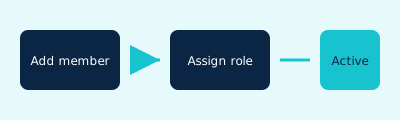
- Add a new member. Tap Create Team Member. Enter full name, email, optional phone, a password that meets the strength rules, and choose a role. Save. The member appears immediately and can log in with those credentials.
- Edit or pause. Open a member to change name, phone or role. Toggle active status to temporarily block login without deleting history. Delete only when the person has permanently left.
- Watch the limit. A warning appears when you approach the plan ceiling. Upgrade if you need more seats.
Free: Not included (team_management gated from Basic).
Basic: Included — up to 5 members.
Professional: Included — up to 20 members.
Enterprise: Included — unlimited members.
Enterprise Plus: Included — unlimited members.
Limits are enforced when creating members. Owner accounts count toward the total on lower tiers. No separate monthly quota beyond the seat limit.
Evidence-based benefits
- Separate logins remove the need to share the owner password.
- Role labels make it obvious who can ring up sales, who works the kitchen and who manages the floor.
- Active/inactive toggle lets seasonal staff keep history without permanent deletion.
- Plan seat limits appear before the create button fails, so owners know when to upgrade.
Prerequisites and limitations
- Basic plan or higher for the Team Management screen.
- Each new member needs a unique email and a password that meets the strength rules (8+ characters, upper, lower, number, special).
- Email cannot be changed after creation; create a new member if the address is wrong.
- Roles control what the person can do inside the app; exact permission matrices are enforced by the backend for each role.
- Invitation resend is available if the first login fails; staff still set or receive their password at creation time.
FAQs
Can Free plan users add staff? No. The Team Management screen and create action are gated to Basic and above.
Does the owner count toward the limit? On Basic and Professional the seat count includes the owner account. Enterprise tiers are unlimited.
What happens if I reach the limit? The create button shows an upgrade prompt. Existing members continue to work.
Ready to give your team their own logins?
Open the NHY app