NHY · Menu

Mark items sold out in NHY so guests never order what you no longer have

One switch hides an item from the digital menu and stops new orders for it. The item stays in your catalogue with a clear badge, ready to bring back the moment stock returns.

Published 22 October 2026

The operating problem

It is 8:30 pm on a Friday. The kitchen just plated the last serving of the house special. A guest at table 3 is already looking at the QR menu. If you leave the item visible, they will order it, the kitchen will have to say no, and the table will feel the friction. Deleting the item loses the photo, description, price and category placement you spent time building. Turning it off for the night used to mean a phone call or a trip back to the counter.

The sold-out toggle solves that without deleting anything. Mark the item sold out in the NHY app and it disappears from every customer menu immediately. Any new order that tries to include it is rejected with a clear message. When the next batch is ready, flip the switch back and the item reappears.
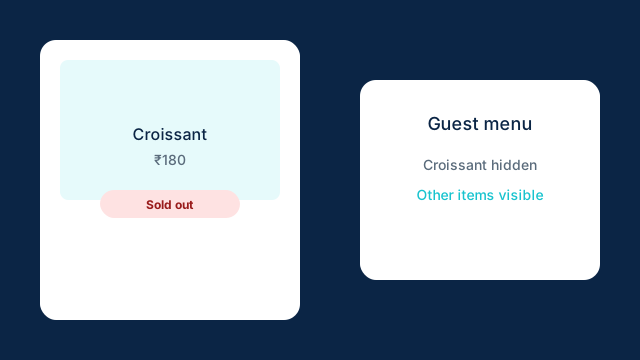
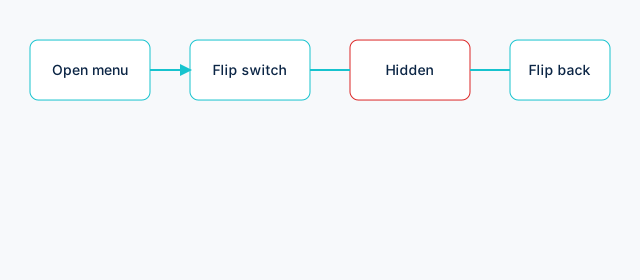
Illustration of a menu item card with a Sold out badge and a toggle switch in the off position for customers
Guests see only available items. The owner’s list keeps the sold-out item with a clear badge.

How the sold-out toggle works

The switch lives on every menu item in the owner and staff views of the NHY app. It is separate from the active/inactive status that soft-deletes an item. A sold-out item remains in your catalogue so you can edit it, see its history and bring it back in one tap.

Only the store’s own staff (owners, managers, cashiers, waiters, kitchen staff) can see or change the sold-out status. Guests never receive the full list that includes sold-out items.

Step-by-step: mark an item sold out

  1. Open the NHY app and go to the Menu builder or the item list.
  2. Find the item (for example, the weekend special biryani).
  3. Tap the “Sold out” switch next to it, or open the item and use the same switch in the editor. The label turns red while the switch is on.
  4. The app saves the change. The item now carries a “Sold out” badge in your list and is removed from every customer-facing menu.
  5. When stock returns, flip the switch off. The item reappears on the QR menu without any further steps.
Four-step workflow diagram: open menu, flip sold-out switch, item hidden from guests, flip back when ready
From the item list or editor to a hidden item and back again.

If the save fails (for example, a temporary network issue), the app rolls the switch back and shows an error so you know the status did not change.

Realistic example

Raj runs a café that sells a limited batch of fresh croissants every morning. By 10:30 the tray is empty. He opens NHY on his phone, finds the Croissant item, and switches it to sold out. The next guest who scans the table QR no longer sees croissants. A regular who already had the item in their cart receives a clear “sold out right now” message if they try to submit. At 11:00 the next tray arrives. Raj flips the switch off and the croissants reappear on every menu within seconds.

No item was deleted. The photo, price, category and any options stayed exactly as they were. The only change was availability.

Plan availability

The sold-out toggle is part of normal menu management. It is included on every NHY plan:

There is no monthly quota or credit cost for marking items sold out. It uses the same menu item limits that already apply to your plan. Inventory tracking and low-stock alerts remain separate features.

Limitations and good practice

Frequently asked questions

Will guests still see the item if they already scanned the QR?

Once the switch is on, the next time their menu refreshes the item disappears. Any attempt to submit an order that still contains the item is rejected with a clear sold-out message.

Can I mark an item sold out from WhatsApp?

Not at the moment. The switch lives in the NHY app under the menu list and item editor. WhatsApp remains useful for sales, stock and order questions.

Does this affect kitchen display or past orders?

No. Existing orders that already reached the kitchen continue. Only new orders are blocked, and the item is simply omitted from new customer menus.

Is there a limit to how many items I can mark sold out?

No extra limit. You can mark as many active items sold out as you need, within your plan’s overall product count.

Keep your digital menu honest

Open the NHY app, find an item that just ran out, and flip the sold-out switch. Guests stay happy and your catalogue stays intact.

Open NHY

PaymentsMatch Zomato and Swiggy settlements to your orders with NHYVoiceAsk about sales, stock and kitchen orders by voice with NHYOffersCreate discount coupons that guests apply on QR orders with NHY

Try NHY free

Start on the Free plan and upgrade when your store needs more.

See plans and pricingOpen the web appGet it on Google PlayDownload on the App Store