Food delivery aggregators such as Zomato and Swiggy bring orders, but the weekly or fortnightly settlement arrives as a CSV full of deductions. Owners need to confirm that every line matches an order that was prepared and billed in NHY, and to understand exactly how much commission, tax and TDS was taken before the net amount reached the bank.
The practical problem
A busy café receives a Zomato settlement file covering two weeks. The gross value looks high, yet the bank credit is lower after commission, packaging fees and TDS. Manually matching each order ID to the POS ticket is slow. Missed matches hide cancelled orders that were still charged, or underpayments. NHY’s aggregator reconciliation imports the CSV, matches lines to orders, and surfaces the totals and exceptions so the owner can review them quickly.
Realistic example
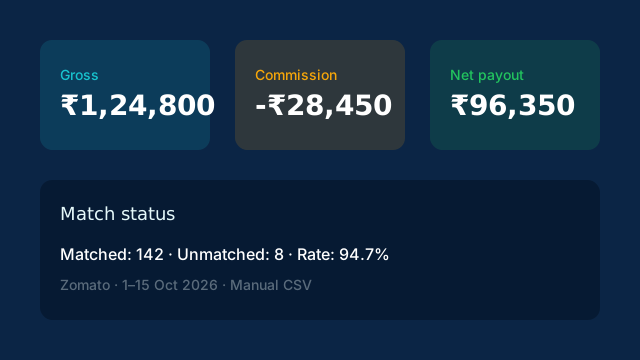
A restaurant owner opens Reconciliation in the NHY app. They download the latest settlement CSV from the Zomato partner portal, upload it, and enter the period dates. After running matching, the summary shows ₹1,24,800 gross, ₹28,450 commission and ₹96,350 net. Eight lines remain unmatched. The owner checks those against kitchen tickets and marks two as cancelled orders that the aggregator later adjusted. The rest match cleanly. On a Professional plan they can connect up to three aggregators; on Enterprise the limit is removed and API import is available.
Step-by-step workflow
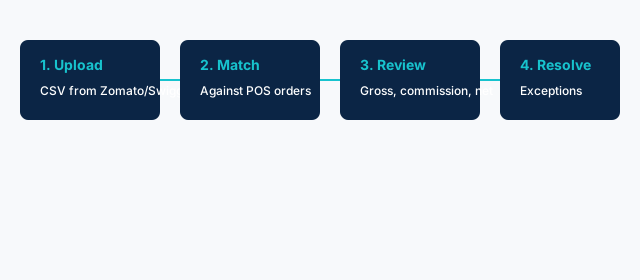
- Open Reconciliation. In the NHY owner app go to the Reconciliation screen. Free-plan stores see an upgrade prompt; Basic and higher can proceed.
- Upload the settlement CSV. Export the settlement or annexure report from the Zomato or Swiggy merchant portal. Upload the file and confirm the aggregator name and date range. Duplicate files are rejected by content hash.
- Run matching. Tap Run Matching. NHY compares each settlement line to existing orders by amount, timing and identifiers. Totals for gross, commission, taxes, TDS and net payout are recalculated.
- Review and resolve. Check the matched, unmatched and partial counts. Investigate unmatched lines against your order history. The screen shows per-settlement cards and an overall totals summary.
Free: Not included.
Basic: 1 aggregator; manual CSV upload only.
Professional: 3 aggregators; scheduled sync supported.
Enterprise and Enterprise Plus: Unlimited aggregators; API access included.
Quota is the number of connected aggregators, not a monthly transaction count. Access is checked server-side.
Prerequisites and limitations
You need an active paid plan (Basic or above) and the Owner, Admin, Manager or FinanceOperator role. The CSV must follow the expected columns from the aggregator portal; a sample is not currently provided in the UI. Matching is order-level against data already in NHY. The tool does not automatically file GST or TDS returns; it prepares the numbers for your review with an accountant. Scheduled and API import paths exist for Professional and higher plans but still require the aggregator connection details you supply.
Helpful FAQs
Can I reconcile both Zomato and Swiggy? Yes. Basic allows one aggregator at a time; Professional allows three; Enterprise allows unlimited. Each settlement batch is stored separately.
What if a line does not match? It appears in the unmatched count. Open the order history or kitchen tickets for that period and resolve the discrepancy outside the tool if needed. Resolved status is tracked on the settlement record.
Does this replace UPI reconciliation? No. Aggregator reconciliation covers platform settlements (commission, TDS). UPI reconciliation covers direct customer payments to your bank or Razorpay. Use both when you accept both channels.
Evidence-based benefits
Owners see the exact commission and net amount for each settlement period without rebuilding spreadsheets. Unmatched lines surface quickly so cancelled or adjusted orders can be confirmed. Because the same numbers feed into NHY’s order records, the review stays consistent with the kitchen and billing data already captured.