Blog · 26 October 2026 · Catalog

Sync your NHY catalog to Shopify so online and floor stay aligned

Enterprise owners connect one Shopify store and keep products, collections, prices, images and availability in step with the live NHY catalog so the floor and the online shop share one source of truth.

The operating problem

Many restaurants, cafés and retail shops run a floor POS and also sell the same items on Shopify. Updating the menu or catalog in two places leads to mismatched prices, missing items, or sold-out products still showing online. Guests order something the kitchen no longer has, or the online price differs from the counter.

A realistic example: Arjun runs a café that also ships coffee blends and merchandise through Shopify. On his Enterprise plan he connects the store once. When he adds a new seasonal blend in NHY and marks it available, the connector creates or updates the Shopify product, places it in the right collection, and publishes it. When he marks an item sold out in NHY, the Shopify product unpublishes so online customers see the current state.
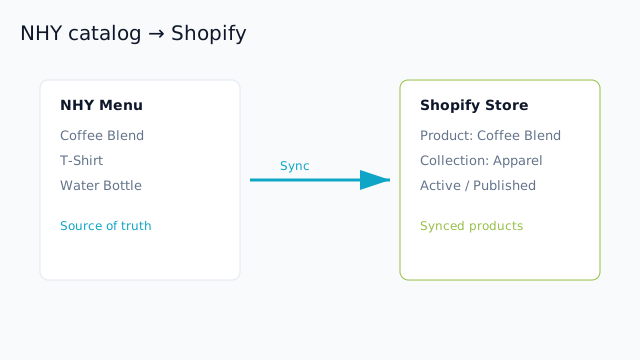
Diagram showing NHY menu items flowing into Shopify products and collections
NHY remains the source of truth. Changes to items, categories, prices and availability sync to the connected Shopify store as products and collections.

How owners use it

  1. Confirm your plan includes the Shopify catalog connector (Enterprise or Enterprise Plus). Free, Basic and Professional plans do not include it.
  2. Install the Nautical POS connector from the Shopify App Store (or the provided install link) on your Shopify store and complete the authorization. Verify your NHY merchant account with the mobile number linked to the store.
  3. In the connector dashboard at connect.nautical.co.in, confirm the store shows as Connected and Active. The mapping uses the permanent Shopify shop identity, not the phone number.
  4. In NHY, manage the catalog or menu as usual — add or edit items, set prices, upload images, assign categories, and mark availability or sold-out status. Categories become Shopify collections; items become products and variants.
  5. Trigger a sync from the connector (“Synchronize menu now”) or wait for the automatic update when catalog changes are saved. Product names, descriptions, prices, images and publish status update on Shopify.
  6. Review the synced products in Shopify Admin. Unpublished or sold-out items stay hidden from the online storefront while remaining in NHY for the floor.

The connector stores only the shop identity, domains, encrypted access token, scopes and mapping records. It does not store Shopify customer data. Owners remain responsible for product compliance with Shopify policies and local rules.

Benefits and limits

One catalog drives both the floor and the online store. Price and availability changes appear in both places without retyping. Images travel with the items when they exist in NHY.

PlanShopify catalog connector
FreeNot included
BasicNot included
ProfessionalNot included
EnterpriseIncluded — sync live catalog to connected store
Enterprise PlusIncluded — advanced sync and custom support

Questions owners ask

Does this update inventory quantities on Shopify?

It syncs product availability and publish status from the NHY catalog. Full stock-quantity sync is not part of the current connector; use NHY inventory tools for the floor and manage Shopify stock separately if needed.

Can I connect more than one Shopify store?

The current mapping is one NHY tenant to one Shopify shop identity. Contact support on Enterprise Plus for multi-store or custom rollout needs.

What happens if I uninstall the app?

Uninstall disables the connection and removes the stored access token. Previously synced products remain in Shopify until you edit or remove them there. NHY catalog is unchanged.

Open NHY and review your Enterprise plan

TablesSet up tables, floor areas and live status in the NHY Tables screenKitchenAdvance kitchen tickets in real time with the NHY Kitchen boardOperationsManage multiple store locations with NHY on Professional plans

Try NHY free

Start on the Free plan and upgrade when your store needs more.

See plans and pricingOpen the web appGet it on Google PlayDownload on the App Store