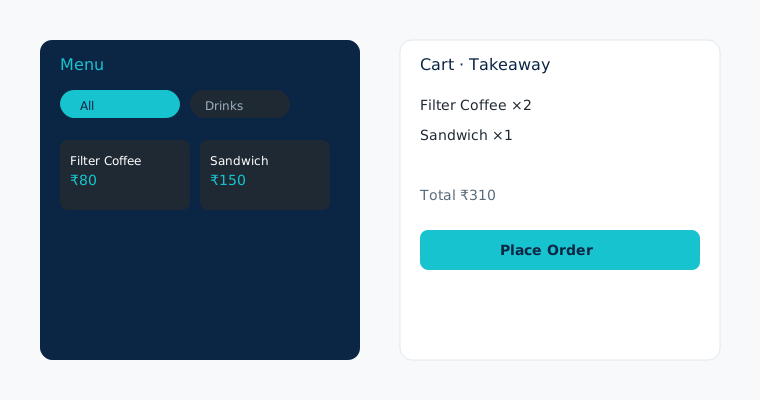
Guests who prefer to order at the counter, or who walk in without scanning a table QR, still need a fast way onto the kitchen board. NHY’s Ring-Up screen is available to owners and authorised staff on every plan. It loads the same menu you already maintain, lets you search or filter by category, add quantities, options and kitchen notes, then place a dine-in or takeaway order. The server re-prices every line from the menu so the total you see is only a preview. Monthly order limits still apply according to your plan.
The practical problem
A busy lunch rush mixes QR orders with people who simply walk up and say what they want. Without a dedicated counter screen, staff either write tickets on paper or open the full order history and risk mistakes. Ring-Up keeps the live menu, stock flags and kitchen routing in one place so the same item that appears on the QR card can be added at the counter in seconds.
Realistic example
A 30-seat café on the Basic plan has three staff on the floor. During the noon rush a regular customer asks for two filter coffees and a sandwich to go. The cashier opens Ring-Up, switches to Takeaway, searches “filter”, taps the item twice, adds the sandwich, notes “extra cheese”, and places the order. The ticket appears on the kitchen display immediately. The same process works for a dine-in table number when a guest prefers not to scan. The café stays well under its 1,000 monthly order allowance.
Step-by-step workflow
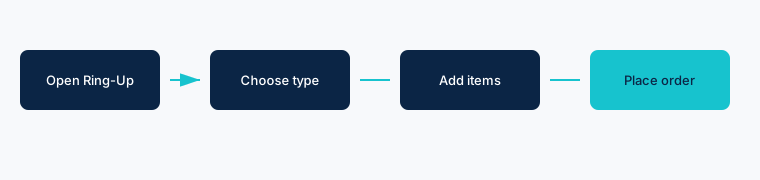
- Open Ring-Up from the owner or staff menu (available on Free and every paid plan). The screen loads categories and active menu items.
- Choose order type. Select Dine-in (then enter a table number) or Takeaway. Optional customer name and phone can be added for the receipt.
- Add items. Search or tap a category. Tap an item to open the options sheet: set quantity, choose add-ons, add a kitchen note, then add to cart. The cart preview updates with subtotal, tax and total.
- Apply a discount if authorised. Owners, admins, managers and cashiers can open the discount sheet and enter a percentage or flat amount. Other roles see the total without the discount control.
- Place the order. Tap Place Order. The server creates the order, prices every line from the current menu, and routes it to the kitchen. You can start a new order or view the list.
Free: Included; up to 100 orders per month.
Basic: Included; up to 1,000 orders per month.
Professional: Included; unlimited orders.
Enterprise: Included; unlimited orders.
Enterprise Plus: Included; unlimited orders.
Discounts are limited to Owner, Admin, Manager and Cashier roles. The screen never changes prices; the server always re-prices from the menu.
Evidence-based benefits
- One menu source: counter orders use the same items, prices and sold-out flags as the QR menu.
- Kitchen sees the ticket immediately, whether the order came from a table QR or the counter.
- Optional notes and add-ons travel with the ticket so the pass stays accurate.
- Role-based discounts keep pricing decisions with authorised staff only.
Prerequisites and limitations
- Any plan can open Ring-Up; monthly order quotas are enforced (Free 100, Basic 1,000, higher unlimited).
- Items marked sold out cannot be added. Inactive items do not appear.
- The total shown is a preview; the server ignores the client totals and re-calculates from current menu prices and tax settings.
- Payment is not taken on this screen; the order is created unpaid and can be settled later through the normal payment flow.
- Table number is required for dine-in orders.
FAQs
Can Free-plan staff use Ring-Up? Yes. Free includes the screen. The 100-order monthly limit still applies.
What if the customer wants a discount? Only Owner, Admin, Manager or Cashier roles see the discount control. Other staff can still place the order at full price.
Does the order appear on the kitchen display? Yes, once the kitchen display system is enabled on Professional plans and above. On lower plans the order still appears in the order list for the kitchen to see.
Ready to take counter orders without paper tickets?
Open the NHY app