Blog · 27 October 2026 · Tax · ← Nautical Blog

Prepare India tax drafts and GSTR exports from your NHY orders

Owners on Basic plans and above can set up company and GST profiles, create filing drafts from live order data, preview calculated tax, generate draft GSTR-1 packages and prepare them for independent accountant review.

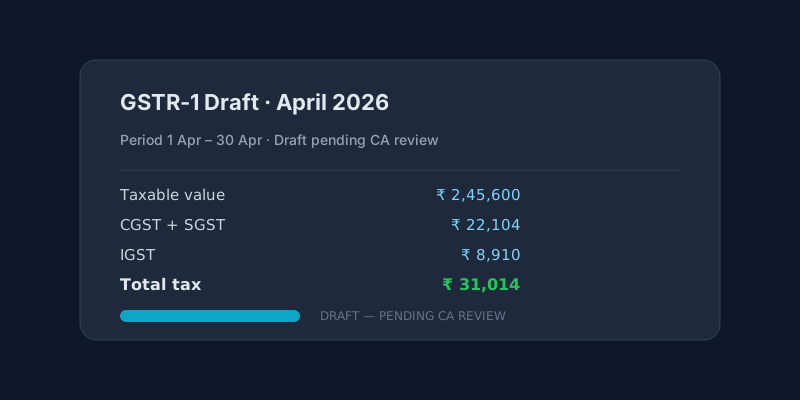
Illustration of a GSTR-1 draft document showing taxable value, CGST, SGST, IGST and total tax with a draft pending CA review banner
Draft tax documents carry a clear “DRAFT — PENDING CA REVIEW” banner until an authorized reviewer locks them. NHY prepares the numbers; filing with the tax authority remains a separate manual step.

The operating problem

At the end of every month a café or restaurant owner in India must prepare GST returns. Pulling sales, payments, refunds, HSN codes and customer state information from the POS, matching them to the correct tax components, and formatting a GSTR-1 package for the accountant is time-consuming and error-prone when it is done in spreadsheets.

NHY’s tax preparation tools turn the orders already recorded in the app into structured drafts. You still review and approve them; the system does not file on your behalf.

Realistic example

A single-location café on the Basic plan opens Tax preparation in the owner console. The owner enters the legal company name, GSTIN, state code and store address, then creates a draft for the previous calendar month with filing type GSTR-1. After NHY reconciles orders, payments and refunds and the owner answers any missing-field questions (for example an HSN code), the preview shows taxable value and component totals. The owner generates the draft PDF and CSV schedules, downloads them, and sends them to the chartered accountant for review before the return is filed on the GST portal.

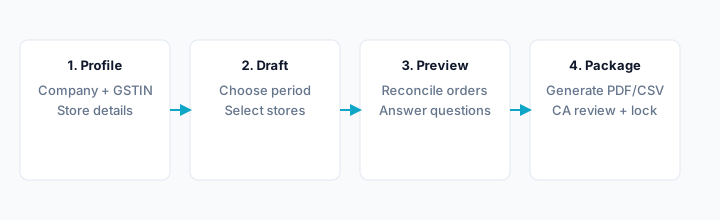
Four-step workflow diagram: set up company and GST profile, create a period draft, reconcile and preview tax, then generate the package for CA review
From profile setup to locked package. Each step stays under owner control; generated documents remain drafts until an independent reviewer approves them.

How owners use it

  1. Confirm your plan includes India tax preparation (Basic or higher). Free plans do not include the Tax Engine or GSTR export pack.
  2. Open Tax preparation in the NHY owner console (Orders area). Add or select your company tax profile: legal name, country (India), reporting currency, GST registration number (GSTIN), state code and store address. A published rule pack for India must already exist; if none appears, a tax administrator needs to publish the applicable rules first.
  3. Choose the reporting period (start and end dates) and filing type (GSTR-1 is the common outward-supplies return). Select the stores to include and create the filing draft. The same period and registration cannot have overlapping open drafts.
  4. Run “Check orders and reconcile payments”. NHY pulls SourceEvidence from your orders, order items, payments and refunds. Review any differences; blocking differences must be resolved before a preview is allowed.
  5. Answer any missing-field questions the system raises (for example HSN codes or customer state when they affect tax). Confirm the answers.
  6. Preview the calculated tax. The preview shows taxable value, component breakdown (CGST, SGST, IGST, etc.) and any findings based on the frozen rule-pack snapshot. No rates are hard-coded; everything comes from the published rule pack.
  7. When the preview looks correct, give explicit consent and generate the draft package. Download the PDF (marked DRAFT — PENDING CA REVIEW), CSV/JSON schedules and evidence manifest.
  8. Submit the draft for independent review. A different authorized reviewer (another owner, admin or TaxReviewer) must approve it. Approval locks the package so it cannot be changed. You then download the locked documents and file them manually on the GST portal or hand them to your accountant.

For India GSTR-1 drafts you can also generate the dedicated GSTR export pack once the draft is ready. The export includes the checklist the reviewer uses before lock.

Evidence-based benefits

Prerequisites and limitations

Which plans include it

PlanIndia tax preparation (Tax Engine)GSTR export pack
FreeNot includedNot included
BasicIncluded; accountant reviewIncluded; tax engine required
ProfessionalIncluded; accountant reviewIncluded; tax engine required
EnterpriseIncluded; accountant reviewIncluded; tax engine required
Enterprise PlusIncluded; accountant reviewIncluded; tax engine required

Pricing evidence comes from the shared featurePricing.json and PlanFeatureMatrix: TaxEngine and GstrExportPack are boolean features present on every tier above Free. GstrExportPack depends on TaxEngine. The public note states that tax documents are drafts for accountant review, not automatic government filing.

Questions owners ask

Does NHY file my GST return automatically?

No. NHY prepares draft packages and GSTR exports that remain marked “DRAFT — PENDING CA REVIEW” until an independent reviewer locks them. You or your accountant still file on the GST portal.

Can I use this on the Free plan?

No. The Tax API and both features are gated to active paid plans. Free users see a clear upgrade message.

What if my rule pack is missing?

The system will not create a draft until a published rule pack exists for the detected country and tax type. Contact support or your tax administrator to publish the India pack if it is not listed.

Do I need extra credits?

No. Tax preparation and GSTR export do not consume AI generation credits. They use the data already in your store.

Open the NHY owner console

Start on the Free plan to try QR ordering, then upgrade to Basic or higher when you need tax preparation.
TablesSet up tables, floor areas and live status in the NHY Tables screenKitchenAdvance kitchen tickets in real time with the NHY Kitchen boardOperationsManage multiple store locations with NHY on Professional plans

Try NHY free

Start on the Free plan and upgrade when your store needs more.

See plans and pricingOpen the web appGet it on Google PlayDownload on the App Store