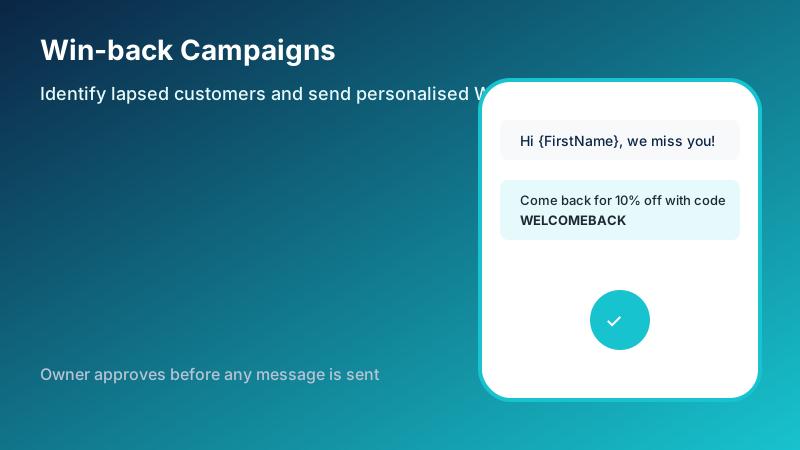
Customers who ordered regularly sometimes stop. They may have tried a competitor, moved, or simply forgotten. Reaching them with a timely, personal note can bring them back without a full marketing campaign or new customer acquisition cost. NHY’s win-back campaigns let owners do exactly that from the app or web, using data already in the system.
The practical problem
Many restaurant, café, retail and service owners notice revenue dips but lack a simple way to list who has not returned in the last month or two. Manual spreadsheets, generic broadcasts, or third-party tools add cost and risk of messaging the wrong people or sending without review. A controlled process that snapshots the right audience, requires owner approval, and respects message limits solves this.
Realistic example
A café owner sees that weekday lunch regulars have slowed. In NHY they create a campaign for customers whose last order was at least 45 days ago and whose last bill was above ₹200. The message template reads: “Hi {FirstName}, we have missed you at {StoreName}. Come back this week and use {DiscountCode} for {DiscountDescription}.” After reviewing the audience count, the owner approves the draft. NHY sends the personalised WhatsApp messages up to the plan’s monthly allowance. The owner can later check how many were sent and any failures.
Step-by-step workflow
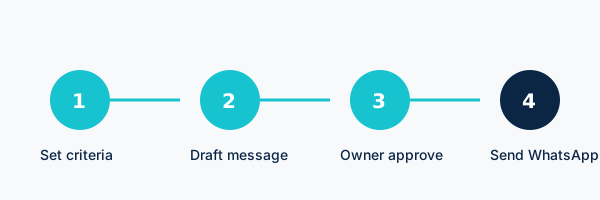
- Open Win-back Campaigns in the NHY owner area (available on Basic and higher plans). If your plan does not include it, the screen explains the upgrade path.
- Set the audience criteria. Choose how many days since the last order (typical values are 30, 60 or 90). Optionally filter by last-order value range and by a specific store. NHY calculates the matching customers immediately.
- Draft the campaign. Give it a name, write the message template using the supported tokens ({CustomerName}, {FirstName}, {DiscountCode}, {DiscountDescription}, {StoreName}, {DaysSinceLastOrder}), and optionally add a discount code and description. The audience is snapshotted so later changes do not alter who is included.
- Submit for approval. The campaign stays as a draft until the owner explicitly approves it. Approval is the required human gate; no messages leave until then. You can also schedule a send time.
- Send. Once approved, NHY delivers the personalised messages via WhatsApp. You see sent and failed counts. Campaigns and messages count against your plan’s monthly quotas.
Free: Not included.
Basic: 1 campaign per month, 500 messages.
Professional: 5 campaigns per month, 5,000 messages.
Enterprise and Enterprise Plus: Unlimited campaigns and messages.
Quotas reset on the calendar month. WhatsApp delivery uses the platform’s existing messaging path; separate provider charges may apply depending on your WhatsApp setup. Unknown limits are not treated as unlimited.
Evidence-based benefits
- Uses order history already in NHY — no extra data entry to build the list.
- Personalisation tokens keep messages relevant without manual editing for each customer.
- Mandatory owner approval reduces the chance of accidental or poorly timed sends.
- Clear monthly campaign and message caps make costs predictable.
- Audience snapshot protects against mid-campaign data changes.
Prerequisites and limitations
You need an active Basic plan or higher. Customers must have prior orders in NHY so the lapsed detector can find them. WhatsApp delivery depends on the connected messaging setup already used by NHY; the feature does not create a new WhatsApp Business account for you. Message templates must stay within the character and policy limits of WhatsApp. Failed sends are reported but not automatically retried beyond the system’s normal handling. This is not a full CRM marketing suite — it focuses on one-time win-back of recently lapsed customers. Free plans cannot access the feature.
Frequently asked questions
Can I edit a campaign after I submit it? Drafts can be adjusted before approval. Once submitted and approved, the snapshotted audience and approved content are fixed for that send.
What if I exceed my message limit mid-campaign? The system enforces the monthly cap before additional messages are sent. Check your current usage in the campaigns list.
Do customers need to opt in again? The feature uses existing customer records from prior orders. Follow applicable messaging and privacy rules for your region; NHY provides the delivery mechanism, not legal advice.
Can I target only one store? Yes. Leave the store filter empty for all stores, or select one.
Ready to see who has not ordered recently? Open the NHY app, go to Win-back Campaigns on a Basic plan or higher, and create your first draft. Go to NHY