← Nautical Blog

NHY · Reputation

Ask for a Google review after the bill is paid

A quiet handoff on the paid receipt — optional for the guest, and only present when the store is on a paid plan with a valid Google link.

Published

The useful moment to ask is when the bill is already paid and open. A counter card is easy to miss, and a next-morning message feels like a follow-up. NHY puts an optional ask on the paid receipt, after the totals, and leaves the writing to the guest.

This is a handoff, not a review writer. The receipt does not draft a rating, does not post for the guest, and does not hide a poor experience. It shows short prompts and a link that opens Google.

The operating problem

A busy café can finish a full Saturday of bills and still have a quiet Google listing. Asking every table out loud slows the floor, and it sounds the same whether the coffee was good or late. Owners should not invent reviews, buy them, or put words in a guest’s mouth. Google expects a genuine experience.

The floor needs one place for the ask, only after payment, and a clear way to skip it.

A realistic Saturday

Harbour Cafe finishes table 4 and the bill is paid. On the receipt, under the total, the guest sees “How was your experience?”, chips such as Food and Service, and “Share your experience on Google”. The note says the review is optional. A tap opens Google in a new tab. Skipping it leaves the receipt as a receipt.
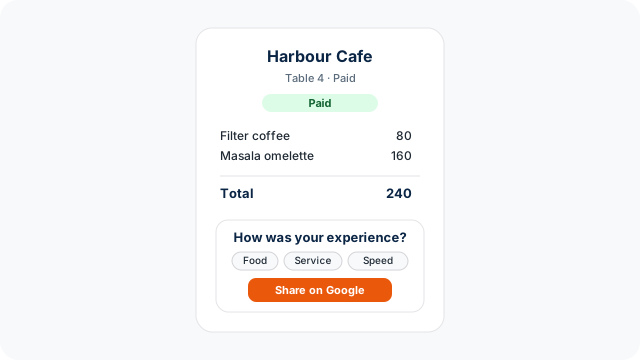
Diagram of a paid cafe receipt with experience prompts and a Share on Google button
Illustration of the paid-receipt handoff. It is a diagram of the layout, not a screenshot of a live store.

What the guest and the owner each do

  1. In NHY, open Store Settings and paste the store’s Google review link into Google review link. Save. The link is stored with the store’s social links as the Google Business field.
  2. Keep an active paid subscription. Free plans, and a paid plan that is not currently active, do not get the section.
  3. Take the order and mark it paid as usual. The receipt page is built for that paid bill.
  4. The guest reads the prompts, if they want, and chooses whether to open Google. They write the review there, in their own words.

The prompts change with the kind of business, so a shop is not asked about ambience in the same way as a dining room.

Store typePrompts on the receipt
Restaurant, café or barFood, Service, Ambience, Cleanliness, Speed, Value
RetailProduct quality, Selection, Staff, Checkout, Value
Service businessService, Staff, Cleanliness, Result, Ambience, Value
OtherQuality, Service, Cleanliness, Experience, Speed, Value

Those chips are reminders. They are not buttons that fill in a review, and they are not sent to Google as the guest’s text.

Which plans include it

The receipt service checks the subscription when the page is built. The section is added only when that subscription is active, already started, not ended, and not Free. The app uses the same split. There is no review credit and no monthly cap in the current entitlement. That is not a promise of unlimited Google visibility. Google still decides what appears on the listing.

PlanGoogle review handoff on paid receipts
FreeNot included
BasicIncluded on paid receipts
ProfessionalIncluded on paid receipts
EnterpriseIncluded on paid receipts
Enterprise PlusIncluded on paid receipts

The same row is on the public pricing page and in the NHY plan comparison. A missing or inactive subscription fails closed: the receipt still shows the bill, without the review block.

Limits you should plan for

This does not guarantee more reviews, a rating, or a place in local search. The change is that the ask sits on a bill the guest already opened, and only after payment.

Questions owners ask

Can staff write the review for the guest?

No. The receipt opens Google and tells the guest the review is optional and should be their genuine experience. Do not offer a reward that Google’s policies would treat as a paid review, and do not pre-write the text.

Where do I get the link?

In Google Business Profile, use the short review link for the place, often a g.page address or a search.google.com write-review link. Paste that exact HTTPS address into Store Settings.

Open NHY and add your Google review link